How To Use Gitlab Push, Pull And More
START HERE :
1. Open Git Bash
We assume that you have Gitlab account and have install Git.
Open Git Bash. Do all these in Git Bash command prompt:
Example with picture
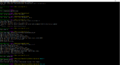
Caption1

1. first, config your git credential: git config --global user.name “John Doe” git config --global user.email johndoe@example.com
2. then checkout git repo of our project: git clone [URL of the git project] E.g. https://gitlab.success-ss.com.vn:8888/root/blinq.git Our is https://valsetech.gitlab etc etc (check from Gitlab)
3. then go to project repo folder: cd blinq-fashion-web
4. then switch to “develop” branch: git checkout develop
5. then create new branch, let call this branch “member-section”: (you can do this in Git Bash or Atom) git checkout -b member-section
6. publish this branch so that other member can also access it: git push --set-upstream origin member-section
7. when you finish a feature and want to merge with latest code, please do: git pull origin develop
then: git push
